Showing posts with label Recommended links. Show all posts

Apr 25, 2015

UXcamp Vienna 2015 - Highlights: Usability testament, little money, heroes & communication

Last week the UXcamp 2015 in Vienna took place. The organizational team did a great job and we had 4 parallel tracks, so a lot of talks we could choose from. One highlight was of course the keynote by Rolf Molich.

Keynote: Rolf Molich - The Testament of a usability professional - 8 lessons from 32 years with usability

I want to highlight two of his learnings - #1 was that the more things change the more they stay the same. I agree 100% with this - because the basics haven't changed: the methods we use in usability haven't changed in the last years and how humans perceive and act is still the same, so the basic design principles are still valid.

And the second lesson was that we as usability engineers should set good examples and should sweep at our own door before you sweep the door of your neighbors. For example also our documents we create should be easily readable for the "users".

Include positive findings in your usability report, because "even developers have feelings".


Session #1: Improve UX with Little Money by @sarapoetze

Sarah presented ideas how UX improvements can  be done if there's not a big budget for usability available. The four topics:
  • Use data that is already there (support request, read reviews in social media, analytics data, use photography for communicating ideas of the users environment to the team)
  • Get information in your team (ad-hoc personas by Tamara Adlin - but be careful!)
  • Get information remotely (remote usability tests, questionnaires)
  • Guerilla testing (test with colleagues, pedestrians, etc.; Informal testing session with users (Barbecue); Tool: Rainbow Spreadsheet (Google))
During the discussion we collected further ideas and it's always a good idea to stick to Standards.

Session #2: Design Heroic Experiences by @DamjanObal

Damjan had a nice idea - he tried to map the Idea of "a Heroes journey" to the process of creating a Product or Project Vision.
Silly outfit
  1. The Quest: What is the Problem we wan to solve? It's necessary to solve a real Problem.
  2. Help Lois: Know the user, know their Problem and help them.
  3. Villains: Who is the competitor? You should know him well.
  4. A hero is special (after dark) & as you and me (during the day): The product is powerful and smart (in the backend) & simple and minimal (frontend).
  5. The super: The product should have something Special.
  6. Silly Outfit: The design makes it complete and can make it catchy.
Stan Lee: "More than normal, but believable."
Don't design something that is "out of space" - it should be approachable.

Damjan provided his slides on Slideshare.

Session #3: Agile Design Thinking in Distributed Teams by @CForaita

Chris presented based on one project how the team managed to work with distributed teams in an agile project.

The core idea was to have one kick-off workshop at the beginning together to share ideas and work on the project together - some details:
Empathy map
  • Keep the team small (only participators, no observers)
  • 3 days: one room, no chair > Idea: No boring Meeting
  • Various methods, but all focused on gathering a lot of data
  • Method for getting everybody at the same bus: 100 cards with random words, they had to scissor out 6 words "How would your product work best?"
  • Empathy map for users
  • Design product box: White paper bags, melt down everything what you learned in the last days > visible what is really important.

Session #4: UX - zwischen Forschung und Praxis am Beispiel Medieninformatik by @peterpur

Peter Purgathofer of the technical university in Vienna presented how they work on projects and presented the project Aurora 2015. This is a tool for sharing information between students and teachers and organizing the tasks the students need to fulfill.
The project is open source and available on github.

Session #5: How can I ensure better communication in teams? by @KarinCepin

The last session was a very interesting talk and discussion of how communication can be improved in teams. Of course a important method here are the "Retrospectives" and that we should pleasure failing.
"Failing is a big methaphor for learning an improving."

We discussed that it is very important to feel save in retrospectives. And Karin recommended the Book "Project retrospectives by Norman Kerth:
"Regardless of what we discover we need to understand that everybody did the best job , … "

During the discussion we collected further ideas how to improve communication in teams:
  • Learning Session: there should be room to share what we learn (e.g. Dev-Jour Fixe).
  • Finding a Mission Statement in the team
  • "Getting to yes"-Method by Steve Blank: if the team has a problem they should ask themselves questions like "What would it cost for the company and would be the impact?" in order to provide this information to the management (further Information)
  • Involve the team (different roles, different departments) in the ideation Phase (e.g. Creating the backlog together with the whole team)
  • Support collaboration with pair programming, pair testing, bug fixing sessions


Like usually at UXcamps I learned a lot, had interesting discussion and met great people, See you next year :-)

Apr 2, 2015

Agile UX - Still some challenges, but I love it

Sprint Burndown (with skier)
Wintery Sprint Burndown :-)
I'm working in a company where agile was implemented several years ago - for me personally I work in agile projects since 2007. I'm a big fan of agile methodologies and I think it is the best process for the kind of software we are working on. I like the close collaboration between the various roles in one team and the early feedback from the customer.

Still I think there is a challenge for implementing UX in an agile process. For me personally the biggest challenge is the continues change of the UI and the interactions. Because additional functionalities are developed over a long period of time it's sometimes hard to integrate new functionalities in an optimal way. Often a UI "refactoring" would be necessary but the costs are at the moment very high and it's hard to convince oneself and the team that THIS bigger change is neccessary NOW.

In the last weeks and months I found the following interesting sources for Agile & UX:
  • UserZoom published a free e-book "The Essential Guide to Integrating User Experience and Usability Testing in Agile" (registration neccessary): Nice overview of agile methods and some concrete suggestions like "A good rule of thumb is a 1:4 ratio of designers to developers. Also be sure to allocate project budget to user research and usability evaluation, ideally 10% of budget is a good target if possible."
  • Lean UX - a great book by Jeff Gothelf
  • One year ago Hoa Loranger of the Nielsen Norman Group published an article about "Doing UX in an agile world" with some interesting findings of case studies and a nice summary of the topic and the main challenges.

Mar 1, 2015

UX-Findings: Develop UX Skills, Mobile UX & #littlebigdetails

Hi,

today I want to share some interesting articles & videos that inspired me in the last months.

Develop UX Skills

In my opinion one important goal of an UX expert should be to further develop know how about users and UX patterns over the time. As a team lead it is important to me to communicate this also to Junior UX Designers.
The article "Time with Users: Set Personal and Company Goals" by Jakob Nielsen was very inspiring for me to directly connect the time spent observing people with the personal goals.

Mobile UX: Luke W-How-To-Videos

The well-known UX expert Luke Wrobleski shared some interesting How-To-Videos on YouTube. He focuses on concrete UX problems in mobile development and explains solutions in detail.

LittleBigDetails - readme.io

There are several websites that collect littlebigsdetails - e.g. littlebigdetails.com. One nice example is the Password-Field of ReadMe.io.Check it out!

Login-Screen of readme.io


Regards, Claudia

Aug 22, 2011

Links - "Best of": 90% don't know CTRL+F, ROI of UX & Google+ Reponsive UI

Hi,

after my Blogging-Summer-Break I want to share again some interesting links of the last weeks.

Crazy: 90 Percent of People Don't Know How to Use CTRL+F
theatlantic.com, Alexis Madrigal - August 18th, 2011
Alexis Madrigal talked with Dan Russel, a search anthropologist at Google, and was surprised that 90% of people don't know how to use CTRL/Comman + F to find a word in a document or web page!

ROI of UX
i-Thought.org, Marie-Claire Jenkins - May 29th, 2011 (already a little bit older)
I'm always interested on how to communicate the ROI of UX to customers and stakeholders. Most of the times these are high-level and boring articles but this article is a short summary and you should have a look at this video created by Susan Weinschenk.


Neues Google+ Feature zeigt Best Practice für responsive UIs und Scrollen
uxzentrisch.de, Tobias Jordans - August 19th, 2011
One of my new favorite blogs is "UXzentrisch" ... but it's only available in German. In this article they talk about the new google+ Feature (You-Tube Video in Englisch) and the best practice of a responsive UI in the browser.

Have a nice day,
Br, Claudia

May 24, 2011

May 6, 2011

Links - "Best of": Mobile Web Design, Integrate UX into Agile Development and Innovative Techniques to Simplify Log-Ins

Hi,

today again I want to share a few links you might be interested in:

Video: Mobile Web Design Interview
LukeW - April 5th, 2011
First I want to share with you an interview of Michael Slater with Luke Wroblewski. In my last post I have written about Lukes book "Web Form Design" and in Summer his new book will be out... "Mobile First". In the short interview he gives an insight in the new book... I'm already looking forward to it.

Integrating UX into Agile Development
UXmatters, Janet M. Six - April 18th, 2011
Ask UXmatters interviewed 6 usability engineers about how they integrate the UX methods into the agile development process. The articles covers topics like Success factors for Agile UX, Adapting User Research to an Agile Approach, Team Dynamics, ....

Innovative Techniques To Simplify SignUps and and Log-Ins
Smashing Magazine, Anthony T - May 5th, 2011
Everybody see it several times every day .... the log-in Screen. Anthony T summarized a lot of techniques how the signups and log-in screens can be improved to help the user. Some of  them are more or less common sense like "Auto-complete the country field" but a few of them are not very often used like "Require users to type their password only once" and "Allow users to  unmask their password".


I'm already looking forward to the UXLX conference next week in Lisbon with a lot of interesting workshops and talks... I will try to share my experiences with you over this blog and my twitter account.

Have a nice day,
Claudia

Feb 18, 2011

UX Events in Europe & why don't usability problems get fixed?

Hi,

today I want to share two user experience events in Europe you might be interested in.

One - I'm not sure if I will attend - is the UX LX in May - an User Experience Event in Lisbon with a lot of interesting speakers and workshops.

The 2nd event is the UXcamp Europe on the 11th and 12th of June in Berlin. I will be there and if you too perhaps we can get in contact...

And now a link that may be interesting for you.

Why don't usability problems get fixed?
UX matters, Jim Ross - February 7, 2011
The usability test is done, you worked on good solutions for the usability problems and presented them to the team.... A few weeks later only a few of your recommendations are implemented - what's wrong?
Jim Ross collected reasons and limitations and also provides some ideas how this problem can be solved.

Have a nice weekend,
Claudia

Feb 7, 2011

SpecLog is here... the new tool for organizing requirements.

Hi,

I'm very proud to inform you about a cool tool where I'm involved as a Usability Engineer in the development. The tool is called SpecLog and should help to organize requirements for agile projects in a more natural way using story maps for showing the relation between goals and user stories and capturing the acceptance criteria.


The best features in my opinion are the TFS integration, the customization of the requirement cards (language and process independent) and of course the synchronisation of the repository (backlog) from different clients. Useful if you have already a backlog is the Excel import.

SpecLog is free at the moment because this is now the beta phase so you have enough time to have a look and try it out.

We already have a lot of ideas how to improve but we are always looking for new inspiration and ideas so your feedback is highly appreciated.

You can find more information and the download link at http://www.speclog.net/.

Have fun...
Claudia

Dec 27, 2010

Links - "Best of": Wireframes to Code, Best Podcasts 2010 & Crappy Surveys

Hi,

perhaps you have at the moment - between Christmas and New Year - more time, so I want to share with you again some interesting articles from the last weeks.
From Wireframe to Code (Part1)
UX matters, Bill Schmidt - 20th of December 2010
How can the workflow be optimized? Is it more useful to have a integrated code approach (use the same artefacts for design and code) or separate code approach (artefacts to communicate design are separate from the final code)?

***
Lauren Cramer, User Interface Engineering, provided an article about the most interesting podcast of 2011 (part 1/part 2) and I want to provide you two I find most interesting:

Design Lessons from Facebook’s 350 Million with Julie Zhuo
2nd of March 2010
A few years ago we heard the following wishes from the customer ... "It should work like google.." "It should work like amazon.." Since a few months (in Europe) we hear "It should work like Facebook"... This is an indicator that this are the trendsetters - Brian Christiansen talks with Julie Zhuo, the Product Design Manager at Facebook, about the balance between the need to launch new features and the necessary user research.

Moving Beyond Static Forms with Luke Wroblewski
11th of February 2010
Last time I already shared a link about Better Form Design... and in this podcast Luke Wroblewski (authour of the popular book "Web Form Design") talks about the changes in the last years reagarding Form Design.

***
User Experience For Developers
UX Magazine - Pek Pongpaet, 23rd of December 2010
Quote: "UX shouldn't be the purview solely of UX specialists; a well-rounded developer can become a UX professional, too." Interesting links and what interested developers should focus on.

***
19 Lessons from United Airlines on How To Build A Crappy Survey
User Interface Engineering - Jared Spool, 26th of December 2010
A funny and interesting to read article about Jared Spools experience with a crappy survey from United Airlines.


I wish you all a happy New Year 2011 :-)
Claudia

Dec 10, 2010

Links - "Best of"

Hi,

today I want to share with you three interesting links from the last weeks....

10 Surefire Ways to Screw Up Your iPhone-App 
UX Magazine, 10th of December 2010
An interesting and fun to read article about how to screw up an iPhone-App - from Information Overload to Not Doing Usability Tests.

When is design done?
The Cooper Journal, 3rd of December 2010

Is the design done when it reaches "perfection", when the requirements are met or when time and money runs out...


Need Better Data? Pay more attention to your webforms
UX matters, 6th of December 2010
"Web forms are like the poor relations when it comes to their getting the attention they deserve from the usability community."
This article is a must read for all who are dealing with webforms in their daily business.

Br, Claudia

Dec 2, 2010

Difference between male and female designers

Today the Webdesigner depot (WDD) provided a interesting post and infographic about the differences of web-design by gender.

Have a look and find out some interesting numbers about the tendency to use large numbers of typeface colors or the use of straight or rounded lines. (Of couse the numbers are no rules, there are only a rough insight.)

Br, Claudia

Jan 20, 2010

Games in applications: Try Ribbon Hero in Word!

Hi,

a few months ago (in October 2009) I wrote a blog post about "The Fun Theory" and how games in applications can help to increase the satisfaction of the users while working with an application.

Today Office Labs (a creative, future-oriented, experimenting department of Microsoft) published "Ribbon Hero" - a concept prototype that should help users to learn Word and Excel. I want to share this with you because this is the first realization using game mechanics in "boring" daily-business applications.


Try it, and probably we can share our highscore in facebook :-).

Br, Claudia

PS: Hopefully my mum likes the game and I needn't explain the ribbon anymore.

Dec 21, 2009

Anybody can do usability ...

Hi everybody

I just read the new blog article by Jakob Nielsen and I want to share this great statement with you:
Usability is like cooking: everybody needs the results, anybody can do it reasonably well with a bit of training, and yet it takes a master to produce a gourmet outcome.

I also have the opinion that everybody - if he/she is interested in the topic - can learn the basic skills to find usability problems in advance (by scribbling screens) or afterwards (by reviewing the application). So, read the article ... it's really great.

Br/Üdv/LG
Claudia

Dec 15, 2009

Agile & User-centered design (the next part)

Hi,


once again I want to share with you an interesting blog article by David Farkas about the agile and user-centered design process and how these can fit together?
... and the solution is "communication". And I agree 100%.
Farkas talks about the agile and the UCD process as two equivalent processes that influence the whole project. In my opinion the agile process effecting the whole team is the framework and I try to integrate and align the UCD process to it.
Farkas also shows in the blog article his view of the project lifespan and the transition from the UCD process to the agile process. As I already mentioned I think the UCD Phase 1 can be part of the first few sprints of the agile process - I don't know any project that starts in the first sprint with the whole UI and interaciton stuff :-). Of course at the beginning there is a lot of work for the usability engineer.
So that's my opinion, but what is yours - or have you any further interesting links you want to share?
Br, Claudia

Sep 17, 2009

Compatibility... different browsers & different operating systems

Hi,
today I want to share with you some nice tools for testing web applications where you can test the appearance and behavior in different browsers and also on different operating systems.

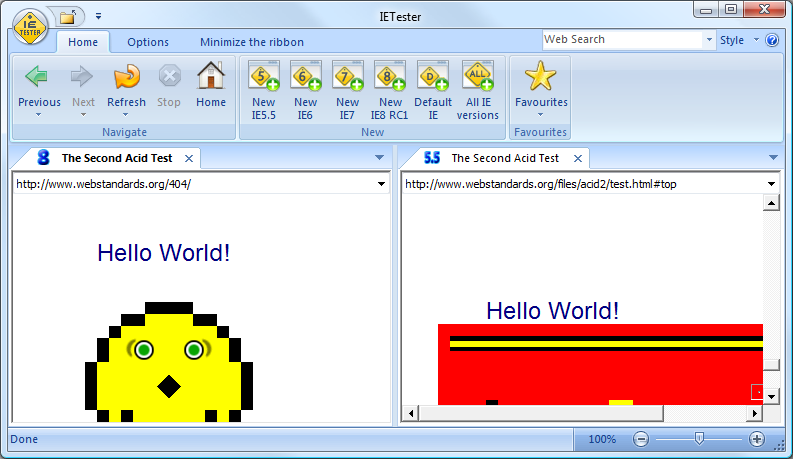
IE Test
We all know the problems with the different versions of the internet explorer and IE Test is a tool to check the application in the versions from 5.5 to 8.

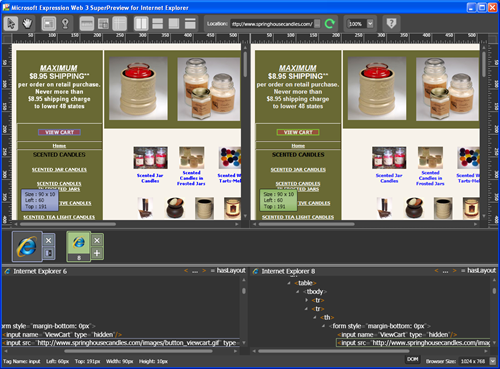
Microsoft Web SuperView
Also Microsoft provides a tool where the application can be tested with different IE-versions and the websites can be compared on one screen. You can download it here.


Browsershots

A very nice tool is browsershots.org. This websites gives you the opportunity to view your website in various different browsers on different operating system. As a result you get screenshots from the specific page in the different environments.

If you know any useful tool it would be nice if you leave a comment.

Br, Claudia

Aug 11, 2009

Web Findings ...

Hi everybody,

today I want to share with you some of the links I found in the last weeks - some of them you probably know because I already posted them in twitter.

A program to simulate colorblindness for Windows, Mac and Linux (in the image below you see the TechTalk-Website with a deuteranopia colorblindness) -> Color Oracle


The first world usability day event in Vienna on 12th of november 2009 -> http://www.worldusabilityday.org/wud09vienna


A nice example that shows the development of a very rough draft to a elaborated wireframe. -> Uwe Thimel's Portfolio on BehanceNetwork


And the last link I want to share is about Personas and how they can be represented ... a lot of different examples -> Fluidproject.org

Br, Claudia

PS: ReMix in Vienna on the 1st of october 2009 > Microsoft

PPS: TechTalk is looking for an creative user interface designer > TechTalk (german text) (or contact me)

Jul 28, 2009

Get information! Interviews with stakeholders and endusers

Hi!
One of the basics you need to create a user-friendly interface is that you should know the user. You should know what are his goals, tasks, abilities, workflows, the environment, etc.

So one of the first step in the user-centered design process is to collect the information. One possibility to do so is to interview endusers as well as stakeholders.

A the beginning the usability expert should collect the questions he wants to ask and should always have in mind the general purpose of the interview. The perfect place to interview the enduser is the environment in which the application will be used, so for example in his/her workplace. The usability expert shouldn't ask question after question but rather let the user talk about their experiences and the expert should observe the behaviour of the user.

Several websites provide lists of questions that can be asked during an enduser or stakeholder interview. One website that provides a lot of information about each step in the usability process is usability.gov. They also provide a list of questions (.doc) that can be asked to the team at the kick-off.

Another good resource is the list of questions by Jared Spool and also the article "Putting context into context".

If you have any other interesting sources/links you're welcome to leave a comment.
Br, Claudia

May 29, 2009

Improving design of web pages

Hi,

today I just want to post a short article about improving the design of your web page. Therefore I want to link you to the post of Matt Cronin who collected some ideas about improving factors.

In his article "8 Layout Solutions To Improve Your Designs" he presents 8 different kinds of new web controls to improve designs. Almost all of them are based on new web technologies like AJAX.

The reason why I got aware of this post is the fact, that I am currently having a problem with a menu that takes away a lot of space. Therefore I thought about using a different control to improve the layout and save some space on the page. After doing some paperprototyping I found a good way to layout the menu using the Accordion control.

The following pic shows my paperprototype of this Accordion control.


In his post, Matt Cronin describes Accordin controls as the following:


Accordion menus are based on the same concept as sliders and tabs: it takes a large amount of information and encapsulates it in a smaller area.


So this control is exactly what I need. And he also provides some good examples and links to existing controls and sample sites which reduces the effort of searching for good controls.

So if you need some inspiration to improve your design, check out the 8 layout solutions. Maybe you'll find some nice controls.

Kind regards,
Harald

Apr 7, 2009

Inspiration needed?

Hi,

today I want to share some interesting links:

And a great website is the "Wall of Deliverables". The idea was born at the IA Summit 2008 in Miami and the aim of the site is to share examples of deliverables.

Have fun, br Claudia

Apr 4, 2009

MIX09, Surface & Userability Podcast (again)

Hi,

today I want to recommend to view the following session videos of the MIX09. Of course the Keynote of Bill Buxton (recommended by michbex) and i was really fascinated by SketchFlow (presented by Christian Schorman - our judge @ Imagine Cup 08) and I'm looking forward to try it out. SketchFlow is currently not included in the Blend3 Preview. This is a screenshot of the SketchFlowPlayer:

Microsoft Surface Stove

A nice april fool by the Silverlight team is the Surface Stove.

20 years, No Improvement?

And one interesting podcast with Scott Berkun is now available at the Userability podcast answering the following question:

Don Norman’s seminal, The Design of Everyday Things, is approaching it’s 20th year in print. It explained why so many basic things in life are poorly designed and hard to use, such as pull handles on doors that need to be pushed. Since the world has been aware of these design flaws for two decades, why are so many basic usability failures still around?

Have fun,

br Claudia