Nov 11, 2009

12.11.2009 - World Usability Day

Hi everybody,

I want let you know that tomorrow is the World Usability Day 2009 and there are a lot of interesting events all over the world. More information about the day in general and events you can find on the general website http://www.worldusabilityday.org/.


In Vienna and Zürich are also some events. In Vienna the german upa - regional group vienna and the Interaction design Stammtisch have organized different workshops and presentations for everyone (in cooperation with Digitalks), an UXcamp for usability professionals and they set up a competition to find the most annoying and frustrating tools - it is called Frustikus. The announcement of the winner will be tomorrow at 8PM in WerzeugH.

More information and the time table can be found at the website of the World Usability Day Vienna.

Have fun.
Br, Claudia

Oct 22, 2009

The Fun Theory or "Can game mechanics helps to improve applications?"

Hi,

today I want to talk a little bit about a very interesting topic - the power of games and how fun can manipulate the behaviour. At the beginning I want show some real impressive videos created by VW for the project "The fun theory".

The idea of the site is that something as simple as fun is the easiest way to change people’s behaviour for the better. In this video they try to increase the number of people recycling glass. (Visit the website and you can find two other nice videos.)


As you can see in this video - if you have fun using a system you will use this more often and have a higher satisfaction using it.

Very extensively the game mechanics are used by social networks - for example on flickr, facebook, twitter, youtube, etc. It's possible to collect things (friends, followers, views), to customize you view/avatar and you can rate things or you can get an rating ("Your profile is 90% complete", etc.)
And also for example on ebay as a powerseller you get points and know on which "level" you are.

The following is an interesting presentation from the Google Tech Talks by Amy Jo Kim from January 2009 about "Putting the Fun in Functional: Applying Game Mechanics to Functional Software" (1h).


Also a nice example is the Google Image Labeler. To label images is a boring work, but now Google tried to make it fun by creating a game out of it (example by John Ferrara - "Extending Game Design to Business Applications" (video) ).

So I think applying game mechanics to applications is really hard to do, but if you can experimenting and test you ideas with users at the end you get a better, more fun product.

Br, Claudia

Sep 17, 2009

Compatibility... different browsers & different operating systems

Hi,
today I want to share with you some nice tools for testing web applications where you can test the appearance and behavior in different browsers and also on different operating systems.

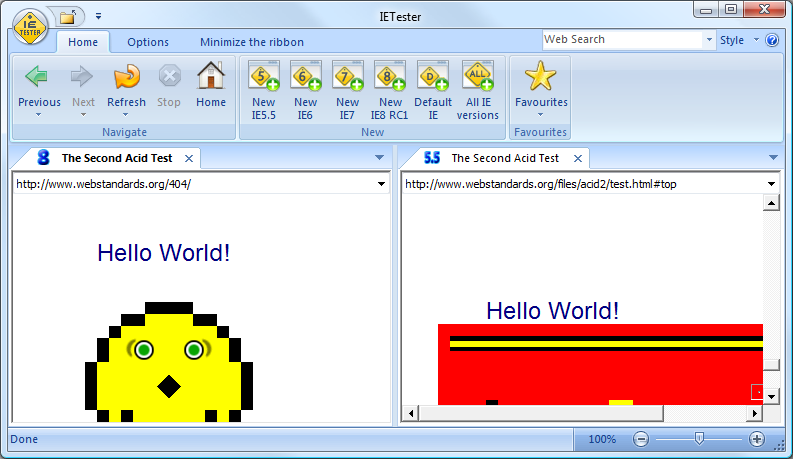
IE Test
We all know the problems with the different versions of the internet explorer and IE Test is a tool to check the application in the versions from 5.5 to 8.

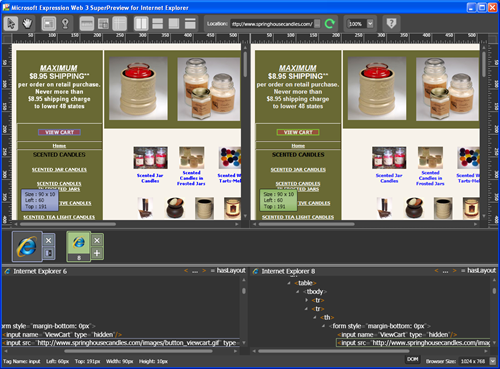
Microsoft Web SuperView
Also Microsoft provides a tool where the application can be tested with different IE-versions and the websites can be compared on one screen. You can download it here.


Browsershots

A very nice tool is browsershots.org. This websites gives you the opportunity to view your website in various different browsers on different operating system. As a result you get screenshots from the specific page in the different environments.

If you know any useful tool it would be nice if you leave a comment.

Br, Claudia

Aug 17, 2009

Review: A project guide to UX design

Hi,

last weekend I read the book "A project guide to UX design - For user experience designers in the field or in the making" by Russ Unger (Twitter) and Carolyn Chandler (Twitter).

I found this book because Robert Hoekman, Jr. mentioned it in his Userability Podcast as one of the top 3 books he would recommend.

In general the book is nice and fast to read, the content is very basic and is a good introduction if you want to start in the field of User experience (for me a little bit to low-level). The book focuses a lot on the topics that are relevant for a UX consultant and cover topics like the project ecosystem, proposals for consultants and freelancers, project objectives and approach and Business Requirements.

More interesting chapters for me were about user research, personas, Transition: from defining to designing, Site Maps and Task Flows, Wireframes and Annotations and Prototyping.

Especially the chapter "Prototyping" was interesting because a few weeks ago I discussed with a colleague and he put the need of prototyping into question. Here are some of the key facts from the book...
"... Remember that prototyping is a process and not an artifact. [...] The outcome of the prototyping process is actionable feedback from concepts that can be used to enhance and improve the design."
And Todd Zaki Warfel, president of Messagefirst said the following regarding the goals of Prototyping:
"Prototypes are a way to achieve one or more of the following goals:
  • Work your way through a design
  • Create a common communication platform
  • Sell your design ideas internally (e.g., to your boss, other designers, etc.)
  • Test technical feasibility
  • Test design concepts with end users/customers"
So in my point of view there are a lot of good reasons for prototyping, because the best or most useable design can only be created in an evolutionary process with a lot of feedback from users, customers and stakeholders.

Br, Claudia

@ TechTalkers: If you are interested in the book I can borrow it to you.

Aug 11, 2009

Web Findings ...

Hi everybody,

today I want to share with you some of the links I found in the last weeks - some of them you probably know because I already posted them in twitter.

A program to simulate colorblindness for Windows, Mac and Linux (in the image below you see the TechTalk-Website with a deuteranopia colorblindness) -> Color Oracle


The first world usability day event in Vienna on 12th of november 2009 -> http://www.worldusabilityday.org/wud09vienna


A nice example that shows the development of a very rough draft to a elaborated wireframe. -> Uwe Thimel's Portfolio on BehanceNetwork


And the last link I want to share is about Personas and how they can be represented ... a lot of different examples -> Fluidproject.org

Br, Claudia

PS: ReMix in Vienna on the 1st of october 2009 > Microsoft

PPS: TechTalk is looking for an creative user interface designer > TechTalk (german text) (or contact me)

Jul 28, 2009

Get information! Interviews with stakeholders and endusers

Hi!
One of the basics you need to create a user-friendly interface is that you should know the user. You should know what are his goals, tasks, abilities, workflows, the environment, etc.

So one of the first step in the user-centered design process is to collect the information. One possibility to do so is to interview endusers as well as stakeholders.

A the beginning the usability expert should collect the questions he wants to ask and should always have in mind the general purpose of the interview. The perfect place to interview the enduser is the environment in which the application will be used, so for example in his/her workplace. The usability expert shouldn't ask question after question but rather let the user talk about their experiences and the expert should observe the behaviour of the user.

Several websites provide lists of questions that can be asked during an enduser or stakeholder interview. One website that provides a lot of information about each step in the usability process is usability.gov. They also provide a list of questions (.doc) that can be asked to the team at the kick-off.

Another good resource is the list of questions by Jared Spool and also the article "Putting context into context".

If you have any other interesting sources/links you're welcome to leave a comment.
Br, Claudia

Jun 30, 2009

Finding design alternatives

Hi,

last week I held an internal workshop regarding heuristic evaluation. Also one part of the workshop was to find the best and the worst design alternative for a specific purpose and today I want to share with you the great suggestions.

The first exercise was to find the worst design for selecting date and time as it is used here:

The first team really quickly found a great worse solution. The user must type in the number of seconds from an specific time on using up and down arrows.

The second team focused on a very often used anti-pattern - drop-down boxes for everything!

And the third group found 3 bad solutions.
The first is a slider where you have to slide to the correct date and time - we don't know if this is technically possible - but a great idea.
The second solution was an empty textfield and the user must type in the date and time in words.
And the idea behind the third solution was to use different controls for each field.


After the fun the teams should focus on finding the BEST solution for filtering an list. The task was described the following:
Find the „best“ design for
multiple filtering on a list of documents


5 different filter parameters (file size, date of the last change, name, read-only, file-type)
Multiple values per filter parameter?
Combination of different parameters and different values of one parameter?

So here you can find some of the solutions. The first team created an control where the user can add filters on demand and then select the related parameters - only the parameters that are available should be shown in the value list of each parameter.
The second team created an solution where the user hast to enter the possiblity to filter using a simple text box or to open the extended mode to filter multiple parameters.


The third team has a really large selection screen - this reminds me on the filtering used on geizhals.at ...

Br, Claudia